
Find my stuff: Home inventory
Miquel MartinezHouse & Home
4.8169.00 Reviews
- Version
- 1.24.1
- Installs
- 50.00K
- Age Rating
- Everyone
Screenshots

Our Review of Find my stuff: Home inventory
 Analysis by Appyee
When I’m standing in a shop trying to remember whether I already own a particular tool, or opening a box during a move and wondering where the rest of its contents ended up, a home inventory is useful only if I can consult it at the right moment. That practical problem is the appeal of Find my stuff: Home inventory: it gives me a way to record household belongings and their locations so I can look them up instead of relying on memory. It’s a House & Home app from Miquel Martinez, and its focus is specific: keeping track of possessions at home, in collections, or around a move.
When a lookup depends on connectivity
There’s a difference between creating an inventory at home and relying on it while you’re out. If I’m checking a stored item before buying a replacement, or trying to answer a question while moving between places, the usefulness of the record depends on being able to reach it on my phone. I’d treat any important lookup as something to check before heading somewhere with unreliable reception, rather than assume the app will work without a connection.
That habit also helps with shared errands. If someone else is picking up a replacement part, I can make the inventory entry more useful by recording the exact location and a distinguishing detail, rather than leaving a vague note like “garage.” A little care when adding an item can save a back-and-forth call later. The trade-off is that a digital inventory asks me to maintain the record; it can’t locate something that was never entered or whose location I didn’t update.
Designed for rooms, boxes, and routines
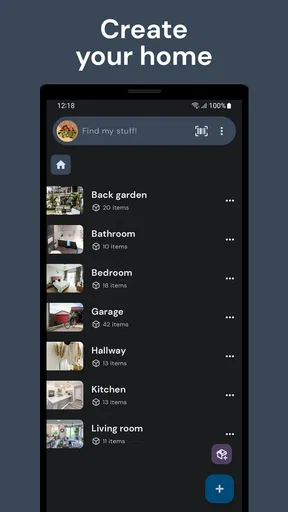
The app’s room-or-zone setup makes sense for more than a tidy, settled house. During a move, I’d use zones to distinguish the rooms a box came from or where it should go, then add useful context to the entries I’m most likely to need before everything is unpacked. For a collection, I’d organize by the place or grouping that helps me find pieces quickly, rather than trying to catalog every possession in one long list.
A realistic example: I’m packing a kitchen and come across a small appliance I rarely use. I can record what it is, add a photo, and note the box or temporary location where it’s going. Later, when I need it before the kitchen is fully unpacked, the entry can narrow the search to the right zone. The useful insight is to record temporary locations during a move and revise them once items settle; otherwise, a once-accurate inventory can become a map to an old packing plan.
For day-to-day use, I’d begin with belongings that are easy to misplace, costly to replace, or annoying to search for: tools, seasonal decorations, spare cables, and items kept in storage. That selective approach is more sustainable than trying to document every spoon on the first evening. It also gives me a quick way to judge whether the habit is worth keeping before I invest time in a more complete catalog.
What the camera and search are good for
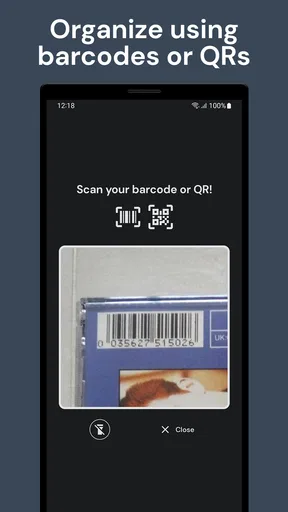
Adding photos can make entries more useful when the name alone is ambiguous. A picture of a particular adapter, a set of matching containers, or a collection piece can help distinguish it from similar items. Barcode scanning is another possible shortcut for products with a readable code, but I wouldn’t make it the foundation of an inventory: many household belongings don’t have a convenient barcode, and a scan still needs a useful location attached to it.
Search is most helpful when entries use names I would actually type under pressure. I’d include a familiar object name and a distinguishing term, such as its color or purpose, in the description. For a shared home, consistent wording matters too: if one person calls something a “step ladder” and another records it as “folding ladder,” either could miss it when searching. The app can make retrieval faster, but the quality of its results depends on how the household labels things.
Reminders, limits, and sensible expectations
Reminders can extend an inventory beyond “where did I put that?” A warranty date or a maintenance prompt may be handy if I already have a clear reason to keep that information alongside an item. I’d use reminders selectively, though. Adding alerts for every small possession can turn a helpful organizer into another stream of notifications to manage, and a reminder is only dependable if its date and details are entered correctly.
There is also a real setup cost. Cataloging takes time, and maintaining locations after a room rearrangement or a move takes a little discipline. A notes app or a basic spreadsheet may be better for someone who wants a bare list and already has a system that works. On the other hand, a paper list can be awkward to search and harder to keep current when several rooms or boxes are involved. I see this app as most worthwhile when room-based organization, photos, barcode scanning, or reminders solve a recurring problem rather than just sound appealing.
Choosing what to record and who should skip it
I’d recommend starting with one problem area rather than treating the app as a weekend-long demand to document a whole home. A crowded storage cupboard is a good test: record the items that disappear behind other things, note their shelf or container, and use the search when you need one. If that small inventory saves enough rummaging to feel worthwhile, expand to another zone. This gives the habit a practical payoff early and avoids building a large catalog that nobody in the household wants to maintain.
It may not suit someone who rarely forgets where things are, owns relatively few belongings, or dislikes entering information on a phone. It’s also not a substitute for a dedicated system when the job is managing stock, tracking sales, or maintaining formal asset records; a household organizer is a different kind of tool. For renters, collectors, and people in the middle of a move, though, being able to connect an object with a room or zone can be more useful than a generic note with no structure.
If you share an inventory with other people, agree on a simple naming habit before adding hundreds of entries. Include the location in language everyone recognizes, and update it when the item moves. That small agreement can matter more than adding extra descriptive detail: a beautifully written record with an outdated location still sends everyone to the wrong cupboard.
Getting Started with Find my stuff: Home inventory
First things first, downloading Find my stuff: Home inventory is a breeze. It’s available on both Android and iOS, so whatever your device preference, you’re covered. Once installed, the app greets you with a clean and intuitive interface that makes you feel like you’ve got your own personal assistant tucked right into your pocket.
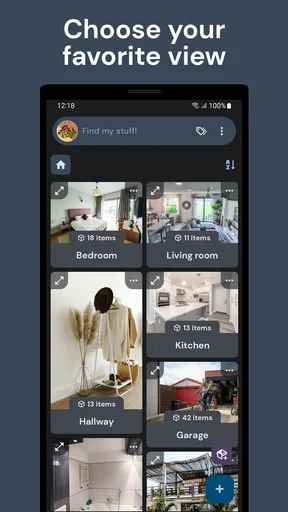
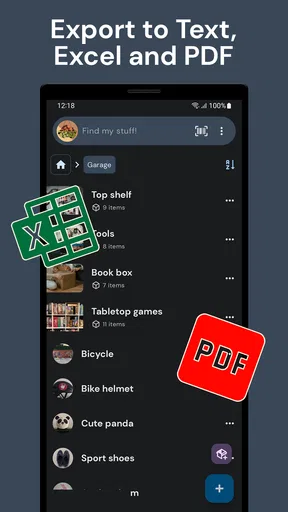
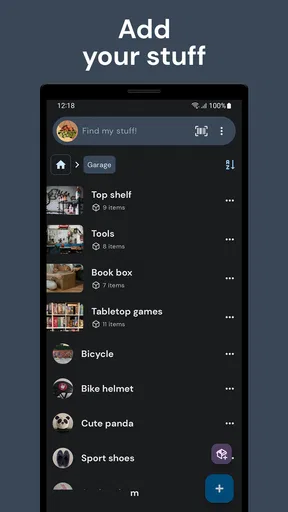
The setup process is straightforward. You’ll start by creating rooms or zones within your home. Whether it’s your kitchen, living room, or even your garage, you can customize each zone to match your actual living space. This is particularly handy if you’re a neat freak like me, who loves having everything in its rightful place.
Cataloging Your Treasures
Once you’ve got your zones set up, it’s time to start cataloging. The app lets you add items with a simple tap, and you can include detailed descriptions, photos, and even purchase dates. This is a lifesaver for those who might need to remember when they bought that snazzy new blender or the exact shade of paint they used in the guest room.
One of the coolest features is the ability to scan barcodes. Just point your camera at an item’s barcode, and the app will pull up all the relevant information. It’s like magic! This function is especially useful for tech gadgets or kitchen appliances.
Staying Organized and Efficient
Now, you might be thinking, "Okay, I’ve logged everything. But how does this help me when I’m in a panic and can’t find my stuff?" That’s where the app really shines. With its robust search functionality, you can locate any item with a few keystrokes. Just type in "coffee mug," and voila, you’re directed right to its location.
For those of us who are more forgetful, the app offers reminders and alerts. You can set reminders for when warranties are about to expire or even when it’s time to rotate those tires you’ve been neglecting. It’s like having a digital prompt that keeps you on top of everything without the headache.
Security and Privacy
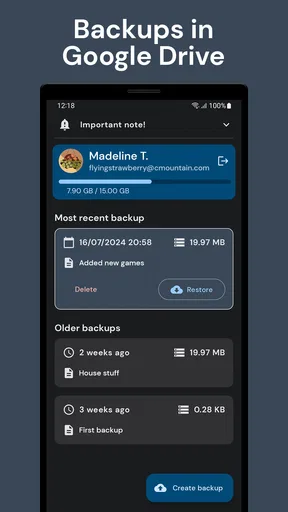
In today’s world, keeping your data safe is crucial. The developers of Find my stuff: Home inventory understand this concern and have implemented strong security measures. Your data is encrypted, and you have the option to back it up to a cloud service of your choice.
Moreover, there’s no need to worry about your data being sold or misused. The app is committed to maintaining user privacy, making it a trustworthy choice for anyone looking to organize their home without compromising their personal information.
Cost, compatibility, and the connectivity trade-off
The app is free to download, with in-app purchases ranging from $3.49 to $14.99 per item. Its age rating is Everyone, and it has a 4.7 average from 785 ratings, with 50K+ installs. Version 1.21.4 lists Android 8.0 as the minimum OS requirement. Those figures make it a well-used option, though popularity alone can’t tell me whether its way of organizing matches my own habits.
Because an inventory can contain details about possessions and where they’re kept, I’d be deliberate about what I record and where I rely on it. I wouldn’t include sensitive access information in an item description, and I’d check that a backup choice suits my own comfort level before depending on it. When network access is uncertain, a sensible routine is to prepare the entries I need in advance and avoid treating cloud access as guaranteed in every place.
Connectivity matters most at the edges of the workflow: when setting up an entry, looking something up away from home, or relying on a backup after changing devices. If an item is especially important, I’d keep a separate note of the critical details until I’m confident my normal access and backup routine work for me. That isn’t a reason to avoid the app; it’s a reminder that an inventory is useful only when both its records and the route to them are dependable.
Final Thoughts
All in all, Find my stuff: Home inventory is a gem for anyone looking to bring order to their home chaos. Its user-friendly design, coupled with powerful features like barcode scanning and reminders, makes it a standout tool for home organization. While it might take a bit of time to initially catalog everything, the payoff is more than worth it.
So, next time you’re tearing your house apart looking for that elusive item, remember that there’s an app for that! With Find my stuff: Home inventory, you can save time, reduce stress, and maybe even spark joy in the process. Happy organizing!
Verdict
Strengths of Find my stuff: Home inventory
- User-friendly interface, easy to navigate.
- Cloud backup ensures data safety.
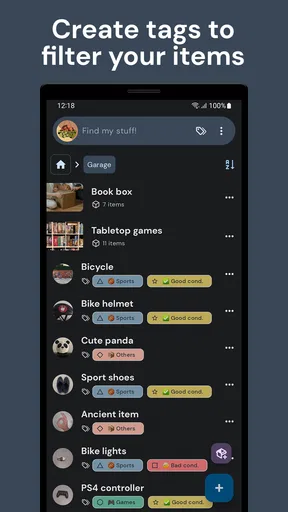
- Customizable categories for items.
- Barcode scanning feature simplifies input.
- Supports multiple users for shared access.
Limitations of Find my stuff: Home inventory
- Requires internet for full functionality.
- Limited free version features.
- Some items need manual input.
- Occasional sync delays reported.
- No desktop app available.
Similar Picks in This Category
View All
Universal TV Remote Control
CodeMatics Media Solutions3.9

AlfredCamera Home Security app
Alfred Systems Inc.4.7

Planner 5D: AI Home Design
Planner 5D4.5

Universal Tv Remote-Cast to TV
One Music Player4.1

Zillow: Homes for Sale & Rent
Zillow Group4.8

99acres Buy/Rent/Sell Property
infoedge.com4.3
Frequently Asked Questions
What is Find my Stuff: Home Inventory?
Find my Stuff: Home Inventory is an app designed to help users catalog and organize their personal belongings. It allows you to create a detailed inventory, complete with photos, descriptions, and locations of your items. This can be particularly useful for insurance purposes or simply keeping track of where your things are.
How does Find my Stuff help with home organization?
The app offers a structured way to manage your belongings by allowing you to categorize and document each item in your home. You can add detailed information such as purchase date, value, and warranty info, making it easier to find items and maintain an organized home environment.
Is my data secure with Find my Stuff: Home Inventory?
Yes, the app provides robust data security measures. It utilizes encryption to protect your information and offers options for cloud backups to ensure your inventory is safe even if your device is lost or damaged. Always check the app's privacy policy for detailed security practices.
Can Find my Stuff be used for insurance claims?
Absolutely. One of the main benefits of using Find my Stuff is its utility in insurance claims. By having a detailed and organized inventory, complete with receipts and photos, you can streamline the claims process with your insurance provider, ensuring you have the necessary documentation ready when needed.
Is Find my Stuff easy to use for beginners?
Yes, the app is designed with user-friendliness in mind. It offers a straightforward interface with easy-to-follow prompts for adding and categorizing your items. Whether you're tech-savvy or new to inventory apps, you'll find it intuitive to set up and manage your home inventory efficiently.
